

- A dataset with one row per option, and a column holding the area each option applies to.
- A filter by this record on the field, which keeps the rows whose area contains the object’s location.
1. Build the dataset
A dataset is a custom type with rows. Give each row:
One option that applies in two markets is two rows, one per area. Coordinates are longitude first, the GeoJSON order. Keep boundaries simple: tens or hundreds of points per area is plenty.
You can paste rows as JSON or CSV when you create the dataset from a field. In CSV, put the area’s GeoJSON in quotes.
2. Point the field at the dataset
- Open the template and select the field.
- Open Options. Under Or narrow from a catalog dataset, choose the Dataset.
- Pick the Stored column (
key) and, if you have one, the Shown column (label).
3. Add the filter
- Under Filter by this record, click Add a filter.
-
Under How to write expressions, choose Offer the rows whose area contains this record and click Use. It inserts:
- Describe it in What this does, for example “Anchors for this market”.
- Under Try it, enter a latitude and longitude, click Run, and check how many rows are offered.
- Click Apply, then save the template.
!json.location || part offers every option until the object has a location. Leave it out if crews should place the object first.
Narrow further
The filter is plain JavaScript, so it can combine the location with other answers on the same object. For example, to also respect a guy size:What crews see
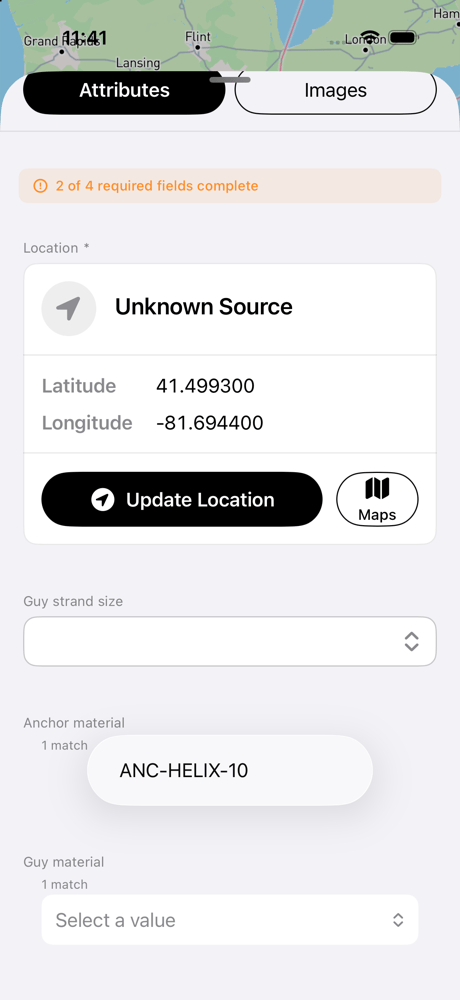
On the phone, a guy in Cleveland is offered only the Cleveland anchor
- Only the options that apply at the object’s location.
- If nothing applies, the field says “No values apply to this record”. A value saved earlier can be removed with Clear.
- If a saved value is not offered at the object’s current location, it stays and the field asks for a new pick. Nothing is cleared for you.
- Without steps, crews pick from the whole filtered list, however long it is.
Crews need an iOS app version that supports filtered dropdowns. Older versions show every option.